
The workspace behind
every helpful answer.
Give customers a useful answer, right on your website. Give your team a clear view of the knowledge, conversations and connected systems behind it.
Watch the film 1 min 18 sec
Meet Reesponder.
See how a question on your website becomes a helpful conversation and a useful next step.
Watch the film 5 min
Take a tour of your workspace.
See where your team manages websites, Knowledge, conversations and connected Actions.
Your support. In full view.
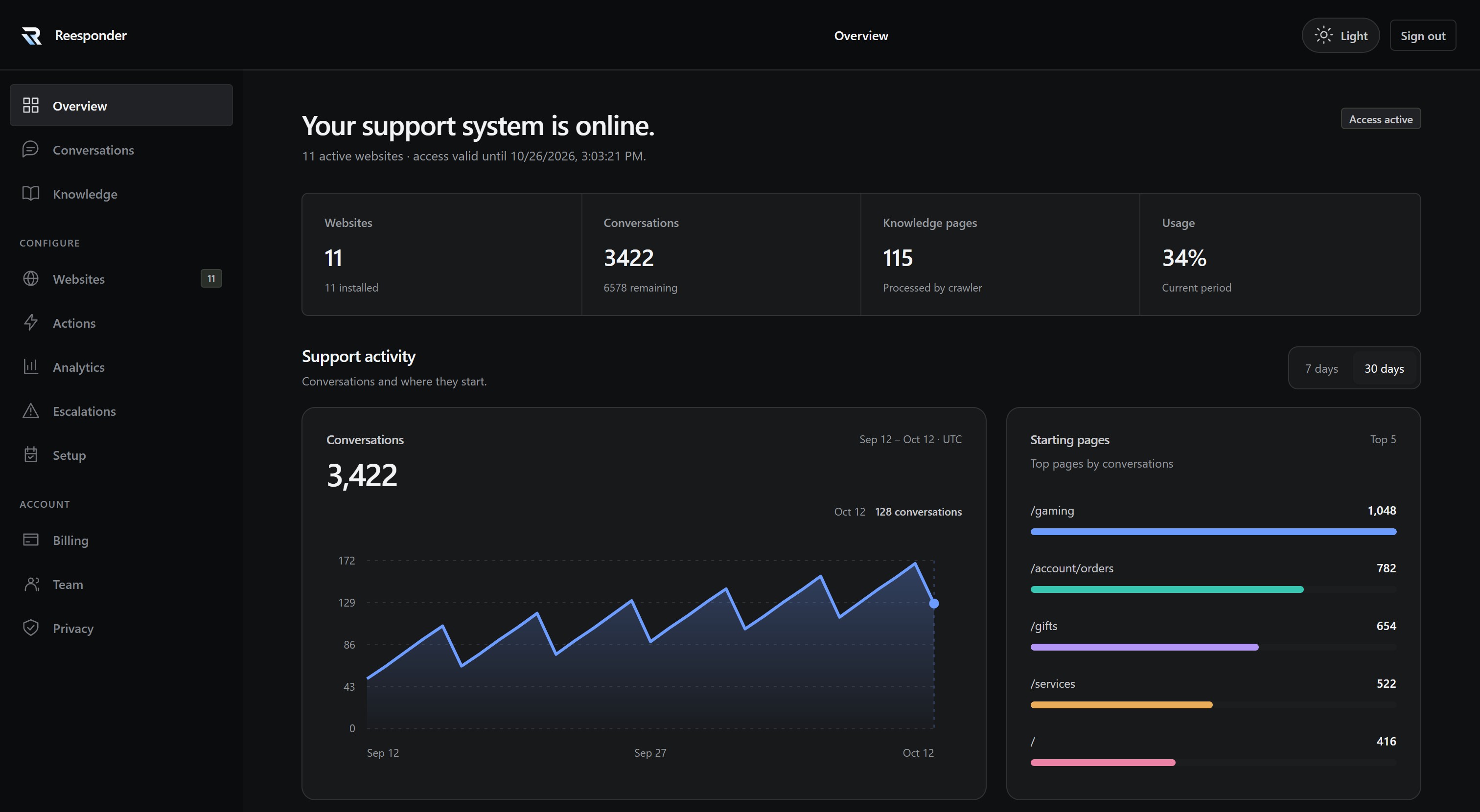
Websites, conversations and Knowledge, together in your workspace.
Explore the workspace journeyClose the workspace journey
Your website.
A little more helpful.
Add your domain, connect your content and install the widget. Each website gets its own space for installation, Knowledge and appearance, all inside the same workspace.
Follow the setup guideConnect a domain and keep every website’s setup status in view. Move between sites without losing track of the business behind each conversation.
Find the installation code and check whether Reesponder has detected the widget on your website. Use the same workspace as your setup progresses.
See the crawl status, processed pages and sources for this website. Add an entry or start a fresh crawl when your content changes.
Set the agent name, avatar and visitor feedback. Business and Scale also include light and dark themes. Appearance changes use your existing installation.
Good answers start
with knowledge you control.
Your website explains what you offer. Your team knows the details. Bring both into Knowledge, inspect what was collected and add the information customers need to move forward.
Search the Knowledge library, check source readiness and see where each source belongs. Shared business information sits alongside knowledge collected for individual websites.
Write verified business facts, policies or answering instructions directly into the workspace. Add the useful detail your website does not yet explain.
Open the collected content and follow its original page link. See the information behind an answer instead of relying on a source title alone.
The question.
The answer.
The whole conversation.
See what customers actually ask and how your assistant responds. Follow the complete exchange, with the website and starting page that put the question in context.
Use real conversations to improve your content, spot recurring needs and give your team a shared understanding of the customer.
Browse conversations across your connected websites. Search and filter the list, then open the exchange that deserves a closer look.
Read the visitor’s messages and the assistant’s replies together, with the starting page and conversation details close at hand.
Ask the questions
your customers will.
Try the website’s current Knowledge in a private preview. Ask about a product, check a policy or try another language before you put the assistant in front of customers.
Create a private five-question test using this website’s Knowledge. Private tests do not consume your customer conversation allowance.
Open the test yourself or copy its private link. Your website workspace keeps the preview controls together.
See how Reesponder answers from the available information, including questions your current content may not yet cover.
A useful answer.
A meaningful next step.
Connect the conversation to the systems your business already uses. Actions can retrieve information, collect a request or work with your API. When a case needs a person, your team receives the conversation and the customer’s contact details.
See Actions in practiceAnswer from your
business knowledge.
Take the next step
through a connected API.
Bring your team in
with the conversation.
Choose supported lookups, request collection or your own API connection. Your plan and the connections you authorise determine the available Actions. Private order data uses its own authorised connection.
On Business and Scale, choose the business mailbox, handling guidance and response expectation for human escalation. Review recent cases from the same screen.
Know what people ask.
See what comes next.
Look beyond an individual exchange. Understand recurring topics, the pages where conversations begin and the outcomes your business records after a customer gets help.
Choose a reporting period, explore conversation counts and recurring topics, and enable a weekly email summary. Use what you learn to improve the pages and Knowledge customers rely on.
With Scale, define outcomes such as a purchase or booking, including a value where useful. Your server integration sends the events that connect those outcomes to conversations.
Your business.
Your team.
Your controls.
Keep the practical side of support in the same workspace. Give teammates their own access, manage capacity and retention, and book help with setup when you need it.
Your customer sees a helpful conversation. Your team controls the information, access and settings behind it.
See your subscription, remaining conversation capacity and automatic top-up setting together. The workspace explains what counts towards the allowance.
Invite a teammate by work email and choose their role. Everyone signs in separately. Invitations expire after seven days and can be revoked.
Choose transcript retention within your plan’s limits and how to handle deliberate off-topic use. Expired transcript text and customer context are removed while anonymous usage aggregates remain.
Choose a day and time for a private 30-minute Zoom setup session. Review the timezone and chosen slot before confirming.
A few things worth knowing.
Clear answers about setup, Knowledge and keeping your team in control.

Website knowledgePages and documents.
Customer contextShared by your integration.
Your controlSources and settings.
Does Reesponder work with my existing website?
Yes, Reesponder works alongside your existing website. Install the widget through the WordPress plugin or your website’s shared layout, then connect the Knowledge your customers need. Visitors can ask questions while staying on the page they are exploring.
Where do the answers come from?
Answers use your business Knowledge and the website context available to the conversation. Add pages, documents and practical guidance about your products or policies to give the assistant useful sources. Configured Actions can also retrieve authorised information from connected systems.
How do I keep the information up to date?
Update the pages, documents and business guidance in your workspace when your information changes. Review the resulting answers with questions customers actually ask. Keeping those sources current helps the assistant explain your latest products, policies and processes clearly.
Can the assistant work with my business systems?
Yes, configured Actions connect the conversation to your business systems. Business includes read Actions for authorised information, while Scale also supports approved write Actions with customer confirmation. Choose a useful task, configure its permissions and test it before publishing.
What happens when a customer needs a person?
Business and Scale provide human escalation so a customer can reach your team when personal help is needed. Configure the destination and review the information passed with the conversation. Your team can then pick up the enquiry with useful context.
Can I test the answers before going live?
Yes, use private assistant testing to check answers before your customers see them. Try common questions, product comparisons and situations that usually need clarification. Update your Knowledge or settings, then repeat those examples until the experience feels right.
Helpful on the website.
Clear inside the business.
Bring your content, conversations and connected systems together. Give customers a reason to continue, and your team a workspace to keep improving.